AL300 Firmware Upgrade
It is possible to upgrade the AL300 Gateway firmware directly from the cloud interface (Over The Air update). If the AL300 is offline or with a data plan for which the download of 300MB is too expensive, it is possible to download the update file and upload it manually.
During the update phase, the Gateway remains fully operational. At the end of the update phase, the gateway is automatically restarted. The downtime caused by a firmware update is therefore around 60 seconds.
Internet connection or power supply not guaranteed? No problem
The AL300 operating system is stored in two twin A-B partitions. While one is running (A), the update is installed on the other (B). Only at the end and verification of the update of the second partition (B) the Gateway is automatically restarted and will run the second partition (B). In case of interruption of installation (lack of internet, lack of power, etc.) the gateway continues to operate with the partition in use (A).
Firmware version selection
To access this feature you need to have administrator permissions.
-
open the settings homepage
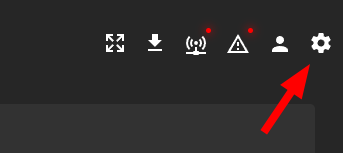
-
open the
Ota Updatemenu and click on the corresponding AL300 Gateway icon
-
select the new version from those available
Over The Air (OTA) update
Note
This procedure causes the download of about 300-350MB of data from the Gateway's internet connection. If it is connected to the internet via a SIM data with limited traffic, make sure that there is a sufficient traffic volume in the active plan, and that any auto-recharge automations are not too slow to keep up with the download process. If mobile data traffic is too expensive, it is recommended to update the Gateway through the procedure described in the next chapter.
-
if the Gateway is connected to the cloud it is possible to select the
Online (OTA)update type, then click onUpdate
-
Wait for the update download

-
Wait for the Gateway reboot

-
Update completed

Local - offline update
-
if the Gateway is not connected to the cloud or the connection to the cloud is too limited in download volume, it is possible to select
Offlineand download the update package.
-
upload the update file to the AL300 through one of the methods described in the dedicated chapter