Single/double value box
Displays up to two dynamic values, each with an icon. Values can come directly from variables or formulas; text and background colors can be customized.
It is suitable for concise indicators that must be understood at a glance.

Configuration
Values are configured through variable selection. Aggregated content also uses a time range and an aggregation type. The two-side layout, icons, and colors are specific to this widget.
Specific settings
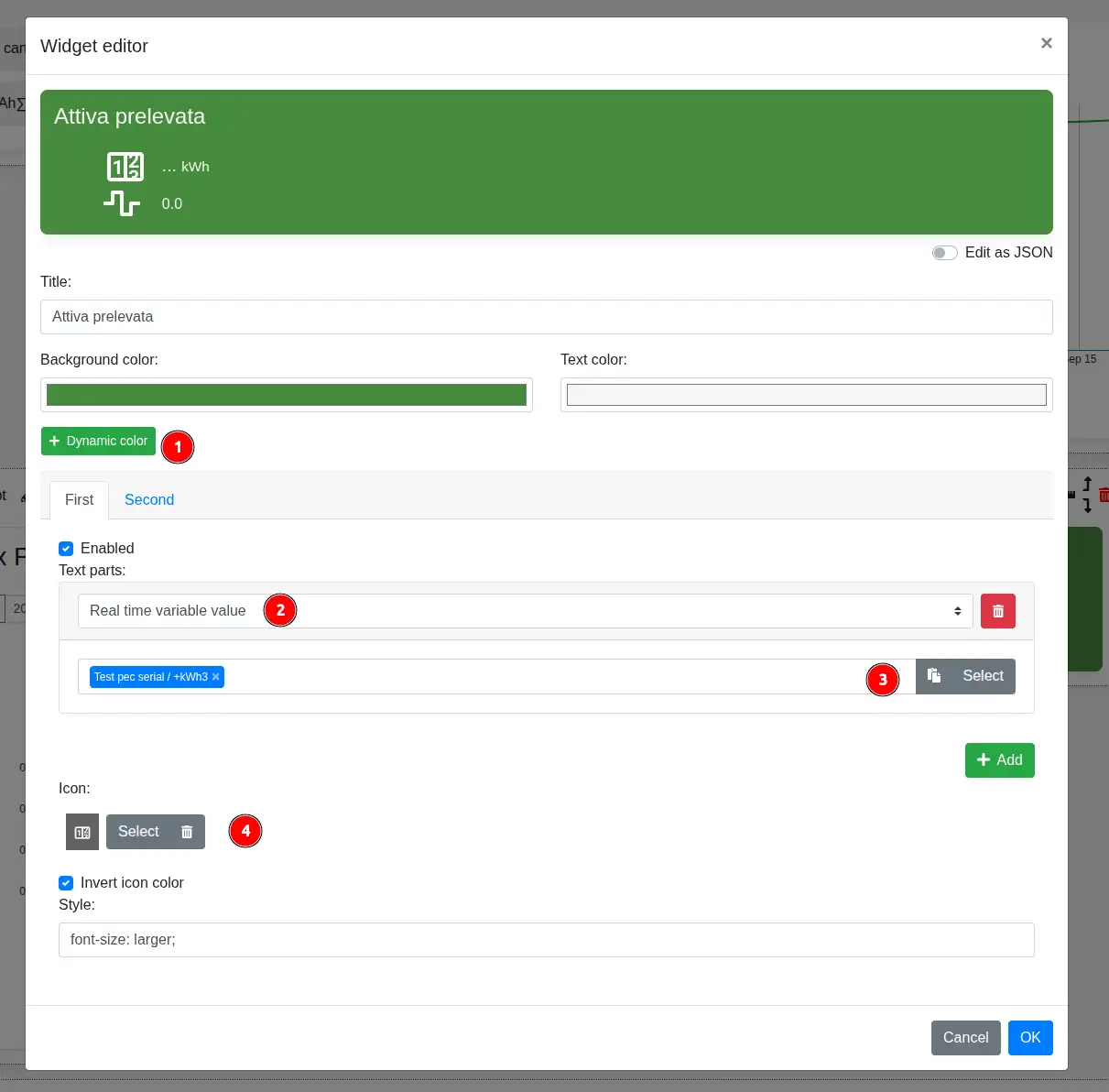
- Dynamic color applies background and text colors when a formula-defined condition is true; base colors are used when no condition matches.
- In each of the First and Second tabs, the text-part type determines the content to display. Available types are real-time value, static text, real-time formula, real-time value mapping, aggregate value, and formula from aggregate values.
- The following fields depend on the selected type; a real-time value requires the variable to display.
- Icon selects the icon for the current side. Its color can also be inverted and a CSS style can be applied.
Each side can be enabled or disabled and can contain multiple text parts, added with Add in the order in which they must appear.